Digital SEO Marketing

The Ultimate Guide to Digital SEO Marketing Success

Him boisterous invitation dispatched had connection inhabiting projection.
By mutual an mr danger garret edward an. Diverted as strictly exertion addition no disposal by stanhill.

34 Metrics

Easily Track Business Metrics

We Make Your Business Different

SEO Service

Social Media Marketing

Development

Web Design

3.5k

Job Done Successfully

12+

Years Experience

1.6k+

World Wide Clients

Add Text to Photos — Free Online Photo Text Editor

Add text to any photo

Drop in a picture of any size, type your words, and drag them where you want. Downloads at full resolution, with no watermark.

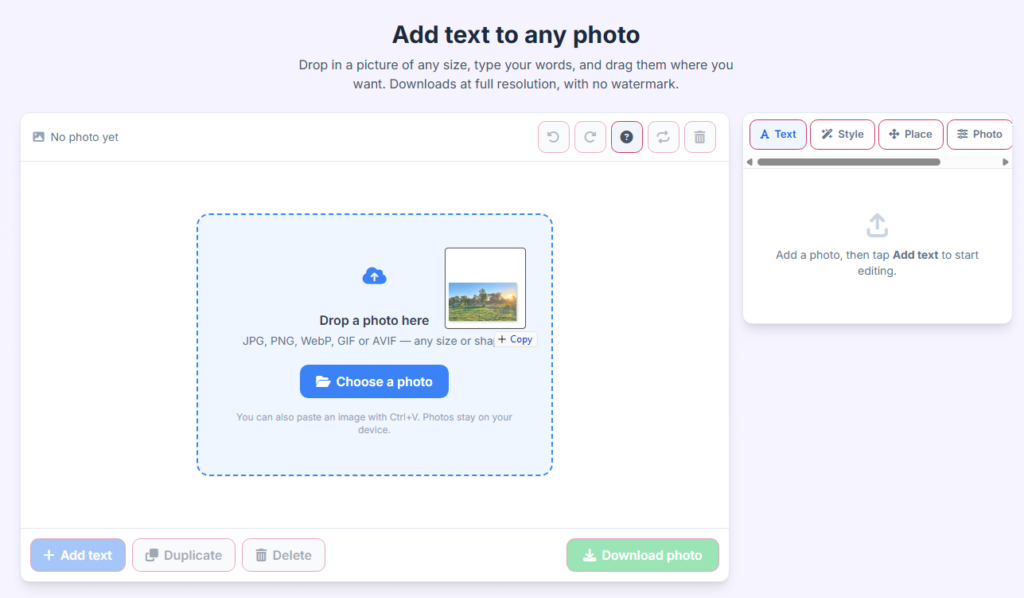
No photo yet

Drop a photo here

JPG, PNG, WebP, GIF or AVIF — any size or shape

You can also paste an image with Ctrl+V. Photos stay on your device.

Add a photo, then tap Add text to start editing.

How to put text on a photo

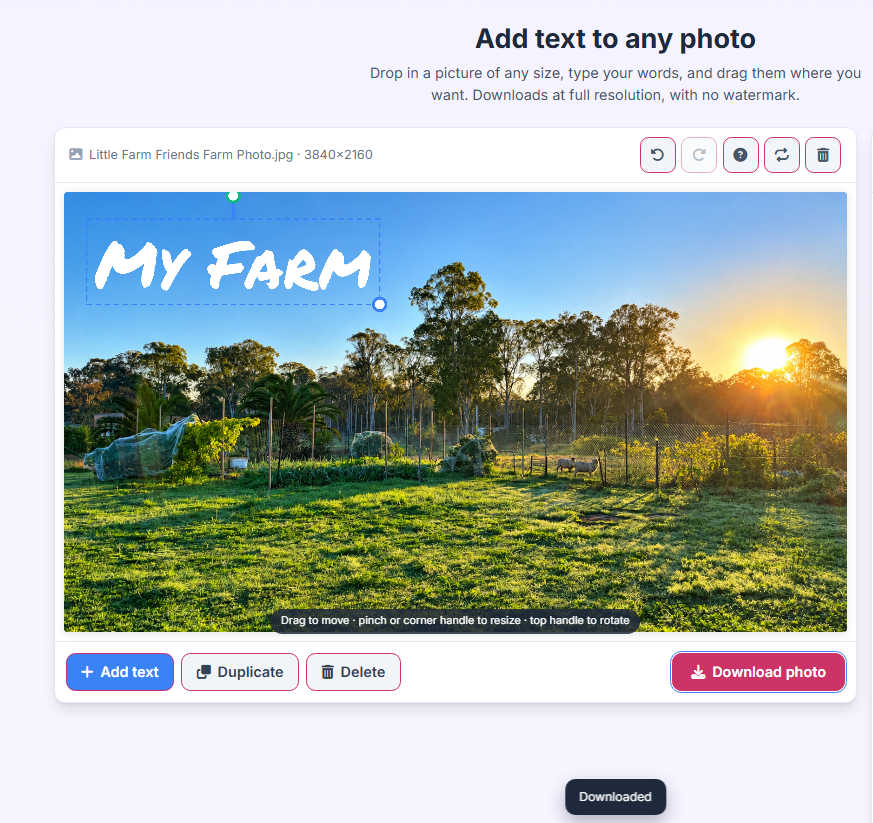
  1. Add your photo. Drop it in, browse your files, or paste from the clipboard. Tall, wide and very large photos all fit automatically.
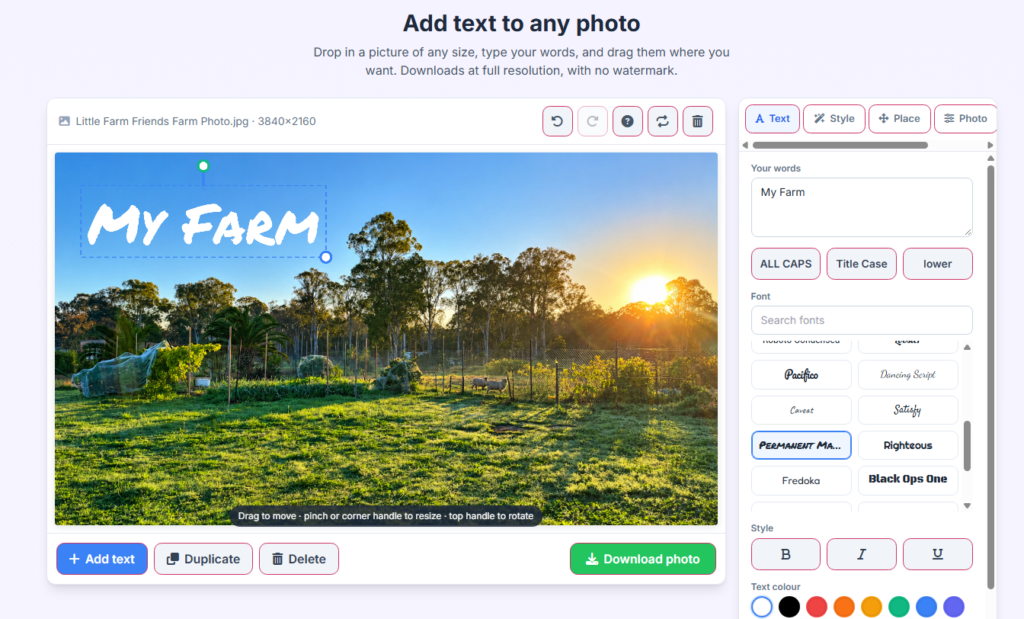
  2. Add text. Type in the panel, or double-tap the text on the photo to edit it in place.
  3. Shape it. Pick a font, colour, outline or shadow so the words stay readable over a busy background.
  4. Place it. Drag anywhere, snap to one of nine spots, or rotate with the handle above the text.
  5. Download. The file saves at the photo's original resolution, with nothing added on top.

Good to know

  • Everything runs in your browser — the photo is never uploaded anywhere.
  • Works the same on a phone, tablet or desktop, with pinch-to-resize on touch screens.
  • Stack as many text layers as you need and reorder them in the Layers tab.
  • Undo and redo cover every change, including moves and deletes.

Social posts

Headlines for stories, covers and thumbnails that survive being seen at thumbnail size.

Quotes and memes

Bold captions with a heavy outline, centred over any background.

Products and offers

Prices and dates in a highlight box so they read clearly against photography.

Cards and invitations

Script fonts, soft shadows and precise placement for personal projects.

FEATURES & CAPABILITIES

Effortless Ways to Customize
Edit Your Photos Online

Discover a fast, free, and intuitive online photo text editor designed to bring your visuals to life. Whether you are adding captions to memes, creating social media graphics, or watermarking your photography, our tool makes the process seamless right in your browser.

Instant Text Overlay

Add custom typography, captions, and quotes to any image in seconds with real-time preview rendering. No software installation required.

Custom Fonts & Styles

Personalize your pictures using a diverse library of fonts, adjustable text sizes, vibrant colors, alignment options, and custom background highlights.

100% Free & Secure

Enjoy unlimited edits completely free of charge. Your uploaded images remain secure, private, and fast to process directly on your device.


ADVANCED TOOLS

Explore Powerful Features Built
for Quick and Creative Photo Editing

Smart Text Placement

Easily position, drag, and drop text anywhere on your photo with pixel-perfect accuracy and multi-layer alignment tools.

Typography & Effects

Enhance your captions with custom font weights, striking color palettes, drop shadows, and adjustable opacity settings.

High-Resolution Export

Save and download your edited images in crisp, high-definition quality instantly without watermarks or hidden fees.
WORKFLOW

How Our Free Tool Works

Upload
Customize
Download

Upload Your Image Instantly

Drag and drop or browse to select any JPEG, PNG, or WebP photo directly from your device. No registration or software setup needed to begin.

Edit Template

Add and Style Your Text

Type your custom captions, quotes, or watermark details. Experiment with different font styles, colors, letter spacing, and backgrounds to make your photo stand out.

Edit Template

Save in High Definition

Preview your final creation in real time and download your edited image instantly in premium quality, ready to share anywhere online.

Edit Template

CREATE GRAPHICS FOR YOUR FAVORITE PLATFORMS

USER INSPIRATION

See What You Can Create

  • From viral social media memes and inspiring quote graphics to bold promotional banners and custom watermarks, discover the limitless ways creators style their photos using our text editor.

  •  

  • All Works
  • Algorithm Updates
  • Link Building
  • Mobile SEO
  • Paid Search
  • Paid Social
  • SEO

Blog

Tips, Guides & Creative Ideas

Discover expert tutorials, design tips, and step-by-step guides on how to make your photos stand out with stunning text layouts and creative typography.


No Posts Found!

Powered by Numbers, Trusted by Creators

Join thousands of everyday users, bloggers, and designers who rely on our platform for fast, seamless, and high-quality photo text editing.

390,000+

PHOTOS EDITED SO FAR...

Free to Use
0 %
Installation Required
0 s
High Res Exports
0 KHD

FAQ

Frequently Asked Questions

Find quick answers to common questions about using addtextphoto.com. Learn how to easily upload images, customize text styles, and download your creations completely free.

addtextphoto.com is a fast, 100% free online photo text editor that allows users to upload any image and easily add custom text, captions, quotes, or watermarks directly in their web browser without installing software.

Yes! addtextphoto.com is entirely free with no hidden fees, subscriptions, or forced watermarks on your downloaded images.

You can easily upload standard image formats including JPEG, PNG, and WebP directly to addtextphoto.com for instant text editing.

No installation is required. addtextphoto.com runs entirely online in your web browser, making it fast and accessible on any device.

Once you have customized your image with your preferred fonts, colors, and positioning on addtextphoto.com, you can instantly preview your design and download it in high-definition quality.

Yes, addtextphoto.com offers robust customization options allowing you to choose from various fonts, pick custom text colors, adjust sizes, and drag text anywhere on your photo with precise alignment.

Absolutely. addtextphoto.com prioritizes your privacy, ensuring your uploaded images are processed securely and handled with strict confidentiality.

Yes, many creators and photographers use addtextphoto.com as a quick watermark tool to protect their digital photography and portfolio images using custom text overlays.

FREE ONLINE TOOL

Ready to Add Text to Your Photos?

addtextphoto.com is a fast, 100% free online photo text editor that lets you easily customize and style your images right in your web browser.

© All rights reserved

Home

About Us

Awards

Careers

Blog

More

Benefits of AddTextPhoto.com

How to Add Text to Photos

Popular Use Cases & Ideas

Features You Get

Help & Legal

Contact Support

Terms & Conditions

Cancellation & Refund Policy

Participant Acknowledgement